Wednesday, May 29, 2013

Oracle Unified Directory 11.1.2.1.0: TNS and EUS - Part 1: TNS Resolving

Part two of OUD.

Start it up

# su - oracle
$ /oracle/Middleware/asinst-1/OUD/bin/start-ds
Just to make things happen, I shut down the firewall:
# service iptables stop
But at least, I can do things like:
frank@ubuntu64:~$ ldapsearch -D "cn=Directory Manager" -w Welcome1 -h oud -p 1389 -b dc=home,dc=local cn=groups -LLL dn: cn=Groups,cn=OracleContext,dc=home,dc=local cn: Groups objectClass: orclContainer objectClass: top

TNS Name resolution

Easy, if you have many database instances, and it comes automatically if you want Enterprise User Security (EUS) as well.
First step is to register the database (needed for EUS; if you just want TNS name resolving, use the Net Manager ($ORACLE_HOME/bin/netmgr), navigate to Command-> Directory-> Export Net Service Names). you can do that with the Database Creation Assistant, but the timing is wrong: dbca usually comes in when the networking is not yet configured.
So, let's do the ldap part of network configuration:
[oracle@idm1 ~]$ cd $ORACLE_HOME/network/admin [oracle@idm1 admin]$ cat ldap.ora DIRECTORY_SERVERS= (oud.home.local:1389:1636) DEFAULT_ADMIN_CONTEXT = "dc=home,dc=local" DIRECTORY_SERVER_TYPE = OID
I want to use the command line version of dbca:
dbca -silent -configureDatabase -sourceDB $ORACLE_SID \ -registerWithDirService true -dirServiceUserName "cn=Directory Manager" \ -dirServicePassword Welcome1 -walletPassword Welkom123
However, it comes back with
Manager is an invalid command line argument.
So I used the GUI. DBCA should be patched to be able to pass parameters with spaces (something with replacing $* with "$@"?!?)
The result is that the instance is registered:
frank@ubuntu64:~$ ldapsearch -D "cn=Directory Manager" -w Welcome1 -h oud -p 1389 -b dc=home,dc=local cn=idm1 -LLL dn: cn=idm1,cn=OracleContext,dc=home,dc=local orclVersion: 112000 orclcommonrpwdattribute: {SASL-MD5}XjChkyAf9xCbtif/veeBqg== objectClass: orclApplicationEntity objectClass: orclService objectClass: orclDBServer_92 objectClass: orclDBServer objectClass: top orclServiceType: DB orclSid: idm1 orclOracleHome: /oracle/db/product/11.2.0 cn: idm1 orclSystemName: idm1.home.local userPassword:: e1NTSEF9ZDdHb1BJeHZ4cktQdVduWE1vYzRlVklFaUprT1NpRGtsWFhEcWc9PQ= = orclNetDescString: (DESCRIPTION=(ADDRESS=(PROTOCOL=TCP)(HOST=idm1.home.local)( PORT=1521))(CONNECT_DATA=(SERVICE_NAME=idm1.home.local))) orclDBGlobalName: idm1 orclNetDescName: 000:cn=DESCRIPTION_0
Now, if I did a tnsping, I used to use tnsnames.ora. However, now I can also use the LDAP server. in order to do that, I have to tell the client environment to use LDAP:
[oracle@idm1 admin]$ tnsping idm1 TNS Ping Utility for Linux: Version 11.2.0.3.0 - Production on 22-MAY-2013 14:33:08 Copyright (c) 1997, 2011, Oracle. All rights reserved. Used parameter files: Used TNSNAMES adapter to resolve the alias Attempting to contact (DESCRIPTION = (ADDRESS_LIST = (ADDRESS = (PROTOCOL = TCP)(HOST = idm1.home.local)(PORT = 1521))) (CONNECT_DATA = (SERVICE_NAME = idm1.home.local))) OK (10 msec) [oracle@idm1 admin]$ vi sqlnet.ora [oracle@idm1 admin]$ cat sqlnet.ora NAMES.DIRECTORY_PATH= (LDAP, TNSNAMES) [oracle@idm1 admin]$ tnsping idm1 TNS Ping Utility for Linux: Version 11.2.0.3.0 - Production on 22-MAY-2013 14:33:52 Copyright (c) 1997, 2011, Oracle. All rights reserved. Used parameter files: /oracle/db/product/11.2.0/network/admin/sqlnet.ora Used LDAP adapter to resolve the alias Attempting to contact (DESCRIPTION=(ADDRESS=(PROTOCOL=TCP)(HOST=idm1.home.local)(PORT=1521))(CONNECT_DATA=(SERVICE_NAME=idm1.home.local))) OK (10 msec)
So, there you have it: Using Oracle Unified Directory server as mechanism to resolve TNS Names.

Saturday, May 18, 2013

Oracle Unified Directory 11.1.2.1.0 configure

Configure ODSM with ADF for OUD

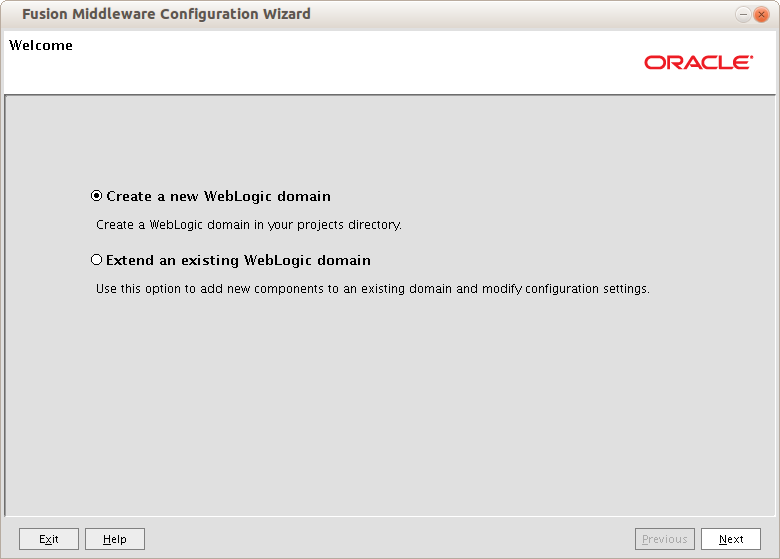
/oracle/Middleware/oracle_common/common/bin/config.sh
Of course, add new domain. There's nothing yet!

Select ODSM and EM; JRF will come automagically

Changing the defaults

Don't forget to document the passwords...

Production mode; I will not develop new apps, so there's
no need to scan for these - it will speed up
the start process. boot.properties can still be used.

You can do it here, or later, but the installer won't (bug?)

Defining a (WebLogic) machine

Select the servers...

...and add them to the machine


Patience...


Configure Unified Directory

export ORACLE_INSTANCE=/oracle/Middleware/Oracle_OUD1 export PATH=/oracle/jrockit-jdk1.6.0/bin:$PATH export JAVA_HOME=/oracle/jrockit-jdk1.6.0 $ORACLE_INSTANCE/oud-setup
Welcome screen
Fill in hostname, and press the Secure Access
button - I want to do Enterprise User Security
Do not try to run off the standard ports 389 & 636,
these are privileged, and there's no actual process.
If wanted, configure port forwarding.
Give the standard user a password, and document that!
TIP: Do NOT use the default, but use a name without spaces
For now, just stand alone
Directory Components - adjust to your liking
Radio buttons... Seems you cannot have both?
Well, you can: take EUS and you can also do TNS resolving:
there is an overlap in classes.
You may want to adjust other settings.
Almost done. There's a dropdown in the upper right corner?
Ah - the command line - for reference.
Done!


Now start the services, and weblogic:
/oracle/Middleware/asinst_1/OUD/bin/start-ds /oracle/user_projects/domains/OUD_domain/bin/startWebLogic.sh &
After creating the /oracle/middleware/user_projects/domains/OUD_domain/servers/AdminServer/security/boot.properties file.
Log in to enterprise manage
Log on to ODSM
And see what's there

Friday, May 17, 2013

Oracle Unified Directory 11.1.2.1.0 Installation

Installation and use.

Having worked on a proof-of-concept which heavily depends on all sorts of Oracle Identity suites, I learned Oracle will probably dump OID (Internet Directory) and OVD (Virtual Directory) over the next 5 years in favor of Oracle Unified Directory (OUD - which means "old" in Ducth).
So, I thought I'd give it a swing and see how I can use it asif it were OID, with which I am familiar. This means I will not only install and configure it, but will also try to use it for:
  • TNS name resolving 
  • Enterprise User Security (EUS) 
  • Integration platform with MS Active Directory (DIP) 
Of course, I want it to do WNA (Windows Native Authentication) as well, hence the Directory Integration (DIP).

Installation of Oracle Unified Directory

Pretty straightforward; you need three components, which are installed quickly:
  1. OUD (Oracle Unified Directory) 
  2. WLS (WebLogic Server) 
  3. ADF (Application Development Framework)

Download locations are eDelivery for OUD (V37478-01), OTN for WebLogic and OTN for ADF. Weblogic version would be 10.3.6, and the matching ADF version is 11.1.1.6.
Make sure you have the correct versions! You will also need some Java runtime; I use JRockit.

You may then fire up the installer: 


Specify the inventory location - if you have installed oracle stuff before, you won't see this screen.


Just run the script, then click OK.


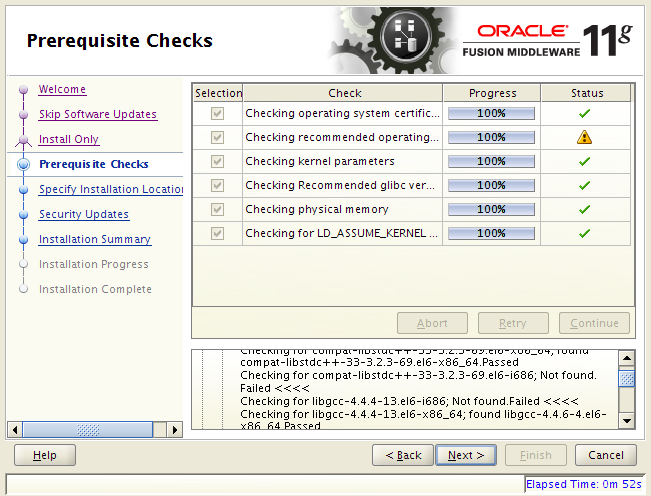
Go through the screens; no Updates or news. Make sure all requirements are met:


Left locations and names default.


Go, go, go! And... done!


WebLogic Installation

This has been documented before. See previous entries. Shorthand:
java -jar /oracle/install/Software/weblogic/wls1036_generic.jar -jreLoc /usr/lib/jvm/jre-1.6.0-openjdk.x86_64

ADF Installation

Start the installer:
/oracle/install/Software/OFM/11.1.2.1/ofm_appdev_generic_11.1.1.6.0/Disk1/runInstaller -jreLoc /usr


Thursday, March 28, 2013

SSO + WNA shown from Apache logging

When SSO works with Windows native Authentication, the Apache logging shows this:
10.10.10.116 - - [03/Feb/2011:11:11:34 +0100] "GET /oiddas/ui/oracle/ldap/das/mypage/ViewMyPage HTTP/1.1" 302 1061 10.10.10.116 - - [03/Feb/2011:11:11:34 +0100] "GET /pls/orasso/orasso.wwsso_app_admin.ls_login?Site2pstoreToken=v1.4~18DD161D~A37A8CBF4314DD9 AA551F4DFA5DBC40B5D7B61E1396C0594942662F41B9E132434B2A6827A7C8AF4169899CCA89FA01B8563DFC4B111BF65AE799D4708B8229989D77B67B10B13FDC8449C72ECB0C6D8814E6275E1E22E1E536DDF9EF17BB3FD03FCB5DD3A6DA3C89EC4D376161A09D8D9E5838936808C5235CE3566FBA104B1A24061433BE20FD2178B5673B13458AE3B4282378195F07FFE1B80A48937E06B49AD10EBDBC1C8075C67B159D351A50D6FA6AFB1AE60184FD25AD7CCA73251CE4025A2F2FE2057652569555DB5731309ACB2B08C4E2D946225706B993D18B06508541D6878319847E367A845A875AD30 HTTP/1.1" 401 5 10.10.10.116 - - [03/Feb/2011:11:11:34 +0100] "GET /pls/orasso/orasso.wwsso_app_admin.ls_login?Site2pstoreToken=v1.4~18DD161D~A37A8CBF4314DD9AA551F4DFA5DBC40B5D7B61E1396C0594942662F41B9E132434B2A6827A7C8AF4169899CCA89FA01B8563DFC4B111BF65AE799D4708B8229989D77B67B10B13FDC8449C72ECB0C6D8814E6275E1E22E1E536DDF9EF17BB3FD03FCB5DD3A6DA3C89EC4D376161A09D8D9E5838936808C5235CE3566FBA104B1A24061433BE20FD2178B5673B13458AE3B4282378195F07FFE1B80A48937E06B49AD10EBDBC1C8075C67B159D351A50D6FA6AFB1AE60184FD25AD7CCA73251CE4025A2F2FE2057652569555DB5731309ACB2B08C4E2D946225706B993D18B06508541D6878319847E367A845A875AD30 HTTP/1.1" 302 2376 10.10.10.116 - - [03/Feb/2011:11:11:34 +0100] "GET /osso_login_success?urlc=v1.4~B91BA2B6B4D2283E24F682058A4C35BE43BFFF319DE5FB0E6A50B007CDC5E1844775AF69F6375E285E26C8512A0CA1D0CB0E28B1444DB72C22E2C2718EA1CF1D2A00F64C805F7446E9E042F0C5573F04E990990B0227858400313478E4CA9E487CD7D33ED6459C5B6A2581B0378F89CE0DD2C75ABD3010EFE6BD4931F34C66B6C564829EED3C2114EC347A04F321515B6A8613B779A612B94D9F18482FB459870EF605FA9E56998AC3B1E810014978FBC27234F49873F954C9A2595C5A9B73C3AB931AA5060FF950D90ABFB5919E63C059ED7756F640E86B368A701CC31DC51F8D8973F78EE05A85B3F94B8210C94B15FBBE59BA78E9786EF03EF826325A3A3D0B04DF9049BE058810E981DF30ED826A3EFE558E8BFB2A4A775057478E2B81F2C7917875F1407896E33AEB28DCCA1A8028136D7993880B7C09CFD958FEFB15384031B81E6756BFB7FDB2CE4070776721E7BDB735BC7D977966CE51CED0C49A25 HTTP/1.1" 302 391 10.10.10.116 - BORTEL [03/Feb/2011:11:11:35 +0100] "GET /oiddas/ui/oracle/ldap/das/mypage/ViewMyPage HTTP/1.1" 200 20229

What happens in detail is this: 

  1. I request my own details page, /oiddas/ui/oracle/ldap/das/mypage/ViewMyPage. 
  2. I get a redirect (http status 302, the next column entry in the log); 1061 bytes returned. 
  3. The redirected page, orasso.wwsso_app_admin.ls_login, reacts with a status 401, which means Unauthorized - send credentials. 5 bytes are returned to the browser. 
  4. Now, it is up to your browser to supply your credentials (or not). 
  5. If your credentials are accepted, the next page, wwsso_app_admin.ls_login, sends another redirect (302) to osso_login_success. 2376 bytes are sent back. 
  6. The final page, osso_login_success, sends the last redirect (status code 302) to the requested original page. 
  7. Once more, /oiddas/ui/oracle/ldap/das/mypage/ViewMyPage appears in the Apache logs, but with two major changes: 
    • my account (BORTEL) is mentioned. 
    • The return status is 200 (success, normal completion). The page contains 20229 bytes.

Monday, March 18, 2013

Configuring Identiy and Access Management 11GR2

In a nutshell:

Start nodemenager
/oracle/middleware/wlserver_10.3/server/bin/startNodeManager.sh
Configure the Identity and Management Suite:
/oracle/middleware/Oracle_IDM1/bin/config.sh
DO NOT START YOUR MANAGED SERVERS!!! There's an omission in the manual... You need to configure the database as security placeholder first. You do that by
/oracle/middleware/oracle_common/common/bin/wlst.sh \ /oracle/middleware/Oracle_IDM1/common/tools/configureSecurityStore.py \ -d /oracle/middleware/user_projects/domains/OAM_domain \ -c IAM -p welcome01 -m create
Now you can start your managed servers.

For some reason, I needed to create a Machine, and add the AdminServer and OAM managed servers to it. Have seen this twice, now.

Then, change the nodemanager.properties file (see [ID 1275344.1]), as it failed to start: 11G OAM_SERVER1 Managed Server Fails To Start With [Security:097533] SecurityProvider Service Class Name For IDMDomainAgent Is Not Specified.
 Weblogic console: overview od oam_server1

Access manager console

Sunday, March 17, 2013

Configuring OID onto the existing IDM domain

Easy enough, when you know how ;)

Start database & listener (of course, your environment is set):
lsnrctl start sqlplus / as sysdba<<EOF startup EOF

Start nodemanager.
/oracle/middleware/wlserver_10.3/server/bin/startNodeManager.sh &

Start the managed servers:
/oracle/middleware/user_projects/domains/OAM_domain/startWebLogic.sh &

Now, start the OID configuration:
/oracle/middleware/Oracle_OID/bin/config.sh

I will be expanding the existing domain
so I need to provide the admin server credentials.
Once that's done, I can choose were to put the
software
Always go for Automatic - see my earlier
article about OID not wanting to run
on privileged ports.


Tuesday, January 15, 2013

Install Identity and Access management Suite 11GR2

Install software

Java

You will need some sort of Java; I have none, and chose to use JRockit. Installing:
[oracle@idm1 ~]$ /oracle/install/Software/weblogic/jrockit-jdk1.6.0_37-R28.2.5-4.1.0-linux-x64.bin Extracting 0%....................................................................................................100%
No Demoes, no source code.

WebLogic

Oracle left the Apache camp, and now wants WebLogic. From what I've seen, not much logic in the product, and it is sloooowwwww to start, and a memory hog. Anyway, prepare by creating the middleware installation directory needed, and install weblogic 10.3.6. Beware, wls and Identity Management product versions are closely coupled. ROT: wls version = IAM version.
[oracle@idm1 ~]$ export PATH=/oracle/jrockit-jdk1.6.0/jre/bin:$PATH [oracle@idm1 ~]$ mkdir /oracle/middleware [oracle@idm1 ~]$ java -jar -d64 /oracle/install/Software/weblogic/wls1036_generic.jar Extracting 0%.......

Choose a Custom install - I have a single machine, not a grid.
Hence, no Coherence. Don't care for an Evaluation db, either.
That's all:

IAM Suite

[oracle@idm1 ~]$ /oracle/install/Software/OFM/11.1.2.0/IAMSuite/Disk1/runInstaller -jreLoc /oracle/jrockit-jdk1.6.0 Starting Oracle Universal Installer... Checking if CPU speed is above 300 MHz. Actual 3379 MHz Passed Checking Temp space: must be greater than 150 MB. Actual 31827 MB Passed Checking swap space: must be greater than 512 MB. Actual 8015 MB Passed Checking monitor: must be configured to display at least 256 colors. Actual 16777216 Passed
Then, the prerequisites fail; on the log, you'll find:
contextFile:/tmp/OraInstall2013-01-15_05-33-27PM/prereq/oui/agent_prereq_context.xml The entry point is: oracle.installType.all Check Name:CertifiedVersions Check Description:This is a prerequisite condition to test whether the Oracle software is certified on the current O/S or not. $$$$$DEBUG>>>>CertifiedVersions Expected result: One of oracle-6,oracle-5.6,enterprise-5.4,enterprise-4,enterprise-5,redhat-6.1,redhat-6,redhat-5.4,redhat-4,redhat-5,SuSE-10,SuSE-11 Actual Result: oracle-Oracle Check complete. The overall result of this check is: Failed <<<<
Not much more to do than edit the refhost.xml file in your install directory, under /prereq/linux64 (if your architecture is Linux 64 bits, of course).


Change "6" into "oracle" (or scroll down to your version of OUL)

That will get you a bit further:

Some libraries do not have both architectures - fail to see why the would be needed now, as we're just installing. Configuring, along with relink (where these libs come in) is done later, so I'll put it on the to-do list for now.

And, some half hour later:

SOA Suite

The SOA suite comes disguised as a patch, but it is a complete install:
[oracle@idm1 ~]$ /oracle/install/Software/OFM/11.1.2.0/SOA/Disk1/runInstaller -jreLoc /oracle/jrockit-jdk1.6.0 Starting Oracle Universal Installer... Checking if CPU speed is above 300 MHz. Actual 3379 MHz Passed Checking Temp space: must be greater than 150 MB. Actual 28680 MB Passed Checking swap space: must be greater than 512 MB. Actual 8015 MB Passed Checking monitor: must be configured to display at least 256 colors. Actual 16777216 Passed
I did change the refhost.xml in the installation directory (subdir Disk1/stage/prereq) in the same way as above

The 11.1.1.6.0 "Patch"

The Libraries error - on the To-Do list

Leave default, as previously. Completed the install:

Directory Services

update: see article on Unified Directory!
 
I want to see the new OID, so I'll install Directory services, too. You would probably install this on another machine, but it does use the same repository database.
Update your refhost.xml before starting:
[oracle@idm1 ~]$ /oracle/install/Software/OFM/11.1.2.0/OFM11.1.1.6.0_Patch/Disk1/runInstaller -jreLoc /oracle/jrockit-jdk1.6.0 Starting Oracle Universal Installer... Checking Temp space: must be greater than 400 MB. Actual 27014 MB Passed Checking swap space: must be greater than 500 MB. Actual 8015 MB Passed Checking monitor: must be configured to display at least 256 colors. Actual 16777216 Passed


The Welcome screen. Also V11.1.1.6.0

Just the install, please. Still have some libraries to force install.

Change the install directory from the default IDM2 to OID

There you go:

Will the weblogic patch cause wls to fail?


Done!