In this entry, I'll demonstrate how easy it is to do Kerberos authentication to the database, or -rephrasing that- how to do
WNA in the database.
The goal of this exercise will be to allow users to log on to a remote database using the following syntax:
sqlplus /@db10g
Scenario
I like to think major sites have serious machines and ditto operating systems. Workstations are uncannily often based on MS Windows, so I'll use MS Windows for a client, and Linux for database server.
Prerequisites
Both client and server need to have the Advanced Security Option installed, for which Oracle wants to get paid. Just read the license conditions: if you want to do Kerberos, you need to pay.
Checks
Now, how do you check whether you have that installed? On *ixes, you can use the command adapters:
Installed Oracle Advanced Security options are:
RC4 40-bit encryption
RC4 56-bit encryption
RC4 128-bit encryption
RC4 256-bit encryption
DES40 40-bit encryption
DES 56-bit encryption
3DES 112-bit encryption
3DES 168-bit encryption
AES 128-bit encryption
AES 192-bit encryption
AES 256-bit encryption
MD5 crypto-checksumming
SHA-1 crypto-checksumming
Kerberos v5 authentication
RADIUS authentication
[ora10@db1 ~]$
According to the documentation, that is proof. I have found that it is not always the case, and you may find yourself without the Oracle Kerberos utilities. Better check if these are available, they sould be:
[ora10@db1 ~]$ ls $ORACLE_HOME/bin/ok*
/oracle/db10/10GRel2/bin/okdstry /oracle/db10/10GRel2/bin/okinit
/oracle/db10/10GRel2/bin/oklist /oracle/db10/10GRel2/bin/okdstry0
/oracle/db10/10GRel2/bin/okinit0 /oracle/db10/10GRel2/bin/oklist0
That concludes checks on the software stack on the server. If you miss anything: install the Advanced Security Option!
Client checks
For MS Windows clients, there is unfortunately not much else to do than to fire up OUI, and list the installed options. Fore mentioned Kerberos utilities should also be available on the client, so you may want to check that out as well.
Hands on
Service Principal
First thing to do, is to allow the database server to get Kerberos tickets. In order to do that, I need a Kerberos service principal. In order to do that, I need to create a domain user on my MS Windows 2000 Domain Controller:
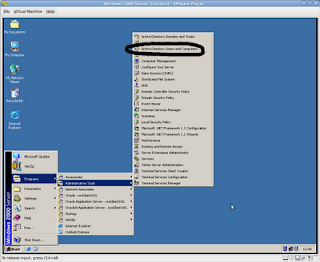
I have chosen the name of the instance, but that does not really matter. You may want to use a more generic user name if you have an environment with many instances per machine.
Make sure you set "Use DES encryption" and "Do not require preauthentication", as shown here:
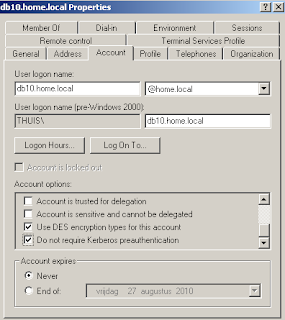
You may have to patch your MicroSoft Active Directory to support this. Check out Knowledge Base article 833708 on how to do this in the registry, or apply SP 1.
I think everybody has SP1 (or better) - I did not have to change anything on my PDC image, but this may cause problems.
Keytab file
Now that I created a user, I must transfer the credentials to the database server. That involves exporting keys to a file, and it is done using this statement on the PDC (or member domain controller):
ktpass -princ service/username@AD.DOMAIN -mapuser username -pass APassWord -DesOnly -crypto des-cbc-md5 -ptype KRB5_NT_PRINCIPAL -out c:\serv.keytab
This is an actual session:
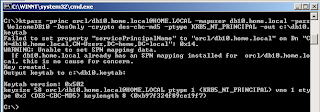
The beauty is, that you may forget the password: you will never need it again. In fact, you need not know the password, unless things don't work, and you want to troubleshoot.
You should remember the service name: you need to specify that in configuration files. I use "orcl" in this example - you may want to use a more generic name, like krb5srv.
Oracle MOS Document states you can only use -crypto des-cbc-crc for encrytion; this is incomplete; you can also use -crypto des-cbc-md5, as I did. (you need md5 for HTTP principals, but that's
an other story).
Prepare server
Binary transfer the keytab file to the server. These files are called keytab files, as they contain a table of keys - the keytab for short.
Logon to the database server an cd to your TNS_ADMIN directory. Which happens to be $ORACLE_HOME/network/admin, if you do not use $TNS_ADMIN.
Alter the sqlnet.ora file to look like:
[ora10@db1 admin]$ cat sqlnet.ora
sqlnet.authentication_services=(beq, kerberos5)
sqlnet.kerberos5_conf=/oracle/db10/admin/krb5.conf
sqlnet.kerberos5_keytab=/oracle/db10/admin/db1.keytab
sqlnet.authentication_kerberos5_service=orcl
sqlnet.kerberos5_conf_mit=true
Make sure the variables point to the correct locations of the keytab file and the (general) Kerberos configuration file. This configuration file contains:
[ora10@db1 admin]$ cat /oracle/db10/admin/krb5.conf
[libdefaults]
default_realm = HOME.LOCAL
[realms]
HOME.LOCAL = {
kdc=192.168.1.250
}
[domain_realm]
.home.local = HOME.LOCAL
home.local = HOME.LOCAL
Mind you, I am completely bypassing the fact, your server should be configured to support Kerberos, i.e. without support for Kerberos on OS level, this is less likely to succeed.
Prepare Client
Client side is about the same as the server, apart from the service principal/keytab file. Change sqlnet.ora:
SQLNET.AUTHENTICATION_SERVICES= (all)
NAMES.DIRECTORY_PATH= (TNSNAMES, EZCONNECT)
sqlnet.kerberos5_conf=C:\oracle\clt10g\network\admin\krb5.conf
sqlnet.kerberos5_conf_mit=true
sqlnet.authentication_kerberos5_service=orcl
# sqlnet.kerberos5_cc_name=C:\oracle\clt10g\network\admin\krbcache
sqlnet.kerberos5_cc_name=OSMSFT://
Note the last line: it is MS specific, and allows the use of the MS Windows internal Kerberos cache, instead of a file based one (as specified the line above).
Note however, using the internal cache will disallow the use of Oracle Kerberos utilities; these will err off with "OSD error"
The Kerberos configuration file is similar to the one on the server, and connects realms to domains:
[libdefaults]
default_realm = HOME.LOCAL
[realms]
HOME.LOCAL = {
kdc = w2k-pdc.home.local
}
[domain_realm]
.home.local = HOME.LOCAL
home.local = HOME.LOCAL
You may now test the Kerberos setup. You should be able to get a ticket from the Kerberos Ticket Granting Server (which is MS Active Directory, in this case).
Try to get a ticket for a known MS domain account, I can log on to the domain "home.local" as frank, that would make my account "frank@HOME.LOCAL" - and be careful, Kerberos is strangely case sensitive! The oklist utility reveals:
Ticket cache: win2kcc
Default principal: frank@HOME.LOCAL
Valid Starting Expires Principal
08-Sep-2010 12:56:03 08-Sep-2010 22:56:03 krbtgt/HOME.LOCAL@HOME.LOCAL renew until 15-Sep-2010 12:56:03
08-Sep-2010 12:56:03 08-Sep-2010 22:56:03 krbtgt/HOME.LOCAL@HOME.LOCAL renew until 15-Sep-2010 12:56:03
08-Sep-2010 13:28:28 08-Sep-2010 22:56:03 orcl/db1.home.local@HOME.LOCAL renew until 15-Sep-2010 12:56:03
08-Sep-2010 12:56:04 08-Sep-2010 22:56:03 W2K-PDC$@HOME.LOCAL renew until 15-Sep-2010 12:56:03
08-Sep-2010 12:56:04 08-Sep-2010 22:56:03 ldap/w2k-pdc.home.local/home.local@HOME.LOCAL renew until 15-Sep-2010 12:56:03
Now, create a database user "FRANK@HOME.LOCAL", in uppercase, and quoted, as Oracle uses the commercial at-sign for special purposes. You should now be able to login:
C:\Documents and Settings\frank>sqlplus /@db10
SQL*Plus: Release 10.2.0.5.0 - Production on Wed Sep 8 13:51:56 2010
Copyright (c) 1982, 2010, Oracle. All Rights Reserved.
Connected to:
Oracle Database 10g Enterprise Edition Release 10.2.0.4.0 - Production
With the Partitioning, Data Mining and Real Application Testing options
SQL> show user
USER is "FRANK@HOME.LOCAL"
SQL>
Stay tuned
Of course, things start getting interesting when adding OID and EUS. Wall-to-wall SSO!
Later...