Wednesday, August 17, 2005

Dogs

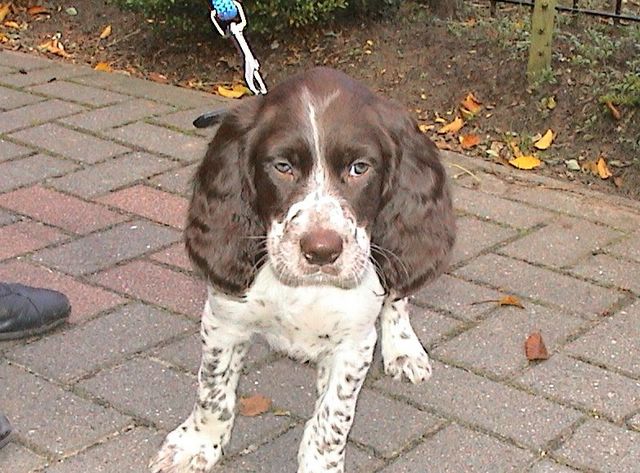
Kijk, da's Sam, "mijn" hond. Ik voel me niet echt prettig bij het idee van eigendom bij levende wezens, vandaar "mijn" tussen aanhalingstekens. Het is net zozeer mijn hond als mijn kinderen mijn eigendom zijn - niet dus.

Sam, 7 weken

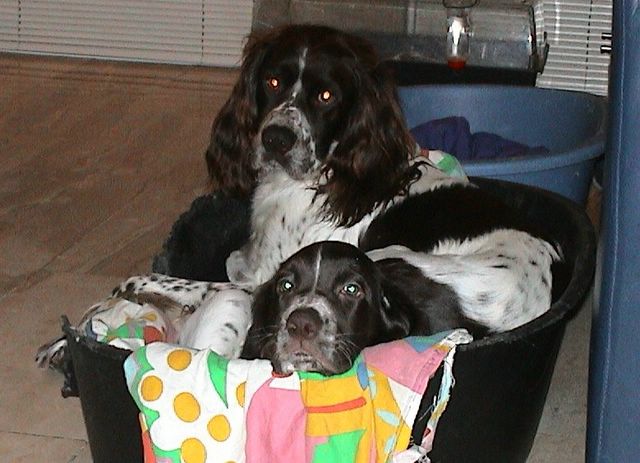
En hier zijn 'the brothers in arms', gebroederlijk in 1 mand:

Sam en Sepp
Sepp is van mijn vrouw, en is inmiddels drie. Hij heet Sepp, omdat hij eigenlijk een duitse staande draadhaar zou worden; naar Sepp in het boek van Rien Poortvliet. Of naar Sepp Maier - wat je wilt. Uiteindelijk is het een Epagneul Français geworden, omdat onze eerste hond, Terry, dat ook was. Een afdankertje, maar wat hebben wij een plezier aan dat beest beleefd! Eigenlijk hebben we daarna nooit zonder hond gezeten, en nu dus twee. Prima honden, afkomstig van de kennel Fleur de Zelande. Wel een eind rijden, maar de moeite waard! Hier is nog een andere site, waar de fokster Jessica zelf op te zien is.
Vooruit, hier is er nog een, uit Februari 2005:


Sam, 6 maanden. En voor de volledigheid, Sepp in zijn jonge jaren:

Sepp, 10 weken

Sunday, August 14, 2005

Magnetic RAM (MRAM) and Spintronics

The latest RAM (Random Access Memory) chips are based on the spinning of electrons, not on the mere presence of electrons.

Many of you know, electrons are negative particles, circling around a positively charged atomic nucleus. Modern physists have problems with that image, as the electron is not just a particle, it's also a wave. And, on top of that, not only does an electron circle around a nucleus, it also spins, circles around itself.
It either spins clockwise, or anti-clockwise (you could also say: it always spins in the same direction, but some electrons stand on their head). This could just as well represent a binary '0' or '1' as (electrical) tension, or current. And that is what MRAM is all about.

As you were told in highschool, electric current and magnetic fields always go hand-in-hand. Move a magnetic field, and you will get an electric current; an electric current will generate a magnetic field.
Transformers are built on this principle: you send (alternating) current through a wire, thus generating an alternating magnetic field. You place a coil in that magnetic field, and a current will result from that. As the magnetic field itself "moves" (it alternates), your coil will keep picking it up. Another rule was the corkscrew rule, defining the relation between force, direction of current and magnetic field direction.

Now, remember those pickup coils on the magnetic drums called computer storage? Those coils actually had to pick up the magnetic field, causing a minute change in electric current (one percent would be normal). Higher density disks, with higher throughput, call for those magnetic fields to become smaller, but also for pick up mechanisms to become smaller. All this causes more 'noise', thus making it extra hard to distinguish the noise from the signal.
Until... Giant Magnetoresistance (GMR) was discovered by Albert Fert and Peter Grünberg, back in 1988. This phenomena, best compared to an optical filter like Polaroid glass, causes a change in magnetic fields to be amplified so that the signal-to-noise ratio improves tenfold. Changes in currents would be 10 percent or more (as opposed to one).

A pickup head would be made out of two parts: a fixed magnetic component combined with a variable magnetic component, glued together with a conductive layer. The variable magnetic component would alter with the passing of a magnetic field (from the platter), and just like light with the rotating of two Polaroid glass sheets, current can either pass easily, or not at all. Well, harder, as due to miniaturization, there is a lot of leaking, but as said, ten percent change in current would be doable.
Disk manufacturers, like IBM, have been using the spinning of electrons on disk platters since some time now (there's a beautiful animated explanation on the IBM website), and the size of the magnetic structures has gone back to some 30 by 200 nm (1 nm = 10^-9 m), some 30 nm apart. All this races underneath a pickup head that flies a couple of nanometers above the platters, which has to be able to distinguish billions of magnetic field changes every second.

The next step.

Some years later, magnetic tunneling was discovered. The first thesis was published in 1995 by Jagadeesh Moodera, and the main difference between the pickup element above, which comprised of three (electrically) conductors, the two magnetic layers are no longer separated by a conductive layer, but by an insulator.
Making this layer thin enough (we're talking atoms here; three to five atoms thickness), electrons can tunnel their way through. Now, we're on quantummechanics territory here, not my forte, but the mechanism is much like the electrical tunneling as used in diodes, e.g. I'll leave it with that. And with the remark, that this tunneling effect makes the difference between passing of electrons increase to 50 or 60%.

Last fall, the first prototype of an MRAM memory chip was presented by Motorola and Cypress Semiconductor. According to some, it's not just a prototype, but a working product, available to companies that want to incorporate it in their products. It's capacity (256 kilobit) is not large enough for any serious use (even your phone uses several Megabit!), but it's a serious start.

By now companies like IBM, Motorola and not since long, Intel, are planning commercial introduction of MRAM, so not much details are revealed. It must be clear, that all has to become smaller, and faster. If all that comes true, picture this:
cellular phones and MP3 players which need recharging only when used. PC's starting up in seconds or less, because the Operating System is loaded off MRAM.
Watch your local store this autumn.

Want to keep up-to-date? Take a look here

Saturday, August 06, 2005

Holiday Season

It's been a while since I posted here. Partly because I've been busy, partly because it's the holiday season, and I value outdoor life over sitting behind a desk when the weather is nice. Enjoying the barb (just purchased a new, larger model), dogs, whine, sun, etc. Which reminds me...

Things I still want to write about:
  • BPEL. IDC wrote a favorable report on BPEL and the use my employer made in local governmental solutions, unfortunately not a public report, but you can have it for $4,000 US. Or contact me, of course.
    The solution even brought us the Oracle 2005 Innovation Award. As I have been involved in the architecture, and was also involved in Web+ (before being knocked down and went out-of-business for a year) in the beginning, this is something I'm proud of.
    The Message Bus and Operational Data Store stuff comes right out of a presentation I gave to the Arnhem civil servants on Data Integration (part of the BRIN project), back in early 2003. The idea is a spin off of the VIAG project, back in 2001.

  • The dogs we have, two Epagneul Français. They give my wife and I a lot of comfort and joy. And they're cute in a sort of way a 35 kg dog can be cute. Very ancient race, goes back to the 12th(!) century.

  • RMAN. Started a booklet, an adventure with RMAN some time ago. Should be finished and published.

  • HTMLDB. Been working with HTMLDB for the last couple of weeks, and I'm impressed. If you haven't done so, take a look at it. There's a playground with Oracle itself, so go ahead and request a workspace. The site just updated to V2.0, which cannot be downloaded yet. Haven't seen in V2.0 much to be impressed by, yet.
    No, I wasn't impressed by the graphics/dropdown stuff. It's implementation I find clumsy, with Javascript, where it could have been XML/DHTML. For some good examples, take a look at Stu Nicholls CSS Playground. All the pictures and stuff could be replaced by Snazzy Bordered Menus. Take a big byte out of your traffic - not a page on the project I do now, exceeds 7kB - yes, that's seven KiloByte!

  • Belgium. Forgot to congratulate our Southern neighbours with their 175th anniversary. Nou, awel, alsnog dan bij deze, eh mannekes? Ik vat er nog wel een pintken op! Of twee.

  • Enterprise Security part X - wrap up. Yes, I know... TDE works though.

Tuesday, July 12, 2005

Ten Commandments for Database Design

We're moving. The office where I work, that is. Shifting through old contracts, articles and designs, I came across a ten year old series by R.J. Veldwijk, called the Ten Commandments for Good Database Design.
They still are true, and probably always will be. Here they are, in short form. I could elaborate, as I have, and keep, the articles, but I'll give the condensed version here for now:

  1. Thou shalt not allow non-atomic data in thy database.
  2. Thou shalt normalize thy design.
  3. Thou shalt strive towards minimizing thy constraints.
  4. Thou shalt not create hierarchical generalizations.
  5. Thou shalt fear the problem of history.
  6. Honour thy documentation: that thy days may be long upon thee.
  7. Thou shalt not fear the modeling of functional aspects.
  8. Thou shalt strive for abstract data models.
  9. Thou shalt take care of thy application structure.
  10. Thou shalt not take gurus' advice for granted.
I like the last one; take good notice of it!

Monday, July 11, 2005

10g Release 2: buggy install scripts?

I tried to install Oracle 10g release 2 yesterday, and I noticed I could not choose what options to install. Did not think much of it, then, but looking at some database options, that are now moved to the companion CD, I still do not have the option to choose; I simply get Workflow along with the database Example schemas...
Humanum erare est...

Sunday, July 10, 2005

Oracle 10G Transparant Data Encryption How to

In my previous post, I already mentioned I misssed the Advanced Security option in my environment. The Database Creation Assistant (dbca) does not allow to add this afterwards, either. Maybe because it does not know what's installed and what isn't, because there is no entry in the (location changed!) oradim file.
Anyway, the beginning looks hopeful.

Step1: Create a Wallet Location.
Oracle does not know where to store the wallet. This can be accomplished by adding the following to sqlnet.ora on the server:
# Added for Transparent Data Encryption:
WALLET_LOCATION =
  (SOURCE =
   (METHOD = FILE)
    (METHOD_DATA =
     (DIRECTORY = /etc/wallets/oracle102)
  )
 )

Step2: Create a wallet.
Open a new session, use the following command to create an empty wallet:
SQL> ALTER SYSTEM SET ENCRYPTION KEY IDENTIFIED BY Welcome1;

System altered.
SQL> host ls /etc/wallets/oracle102
ewallet.p12
Seems to work - Oracle does not recommend this way of setting the wallet location, but the use of ENCRYPTION_WALLET_LOCATION; use this specifically for this purpose; the wallet_location is more generic, and could cause problems with Enterprise Security.
OK - as I still need a signed, auto-login certificate, I use the Oracle Certificate Autority Server as done before. Certificate #7 was issued.
As I use the good old password I use for Demo certificates, I then have to issue:
SQL> ALTER SYSTEM SET ENCRYPTION KEY IDENTIFIED BY "Welcome1";
System altered.
Seems unneccesary; it's an auto login wallet

Step 3: Create a user.
Looks Promising, let's continue:

SQL> create user scott identified by tiger;
User created.

SQL> grant create session, create table, create view, create sequence to scott;
Grant succeeded.

Mind you: one of the features of 10g Release 2 is that the connect role has been stripped, basically forcing you to think about security! A change for the better, I'd say!

SQL> alter user scott quota unlimited on users;
User altered.
SQL> connect scott/tiger
Connected.
SQL> create table enc_demo (col1 number(10), col2 varchar2(30));
Table created.

SQL> insert into enc_demo values(1,'First test Data Encryption');
1 row created.

SQL> insert into enc_demo values(2,'Transparent Encryption used!');
1 row created.

SQL> commit;
Commit complete.

SQL> select * from enc_demo;
COL1 COL2
---------- ------------------------------
1 First test Data Encryption
2 Transparent Encryption used!

Step 4: Encrypt!
SQL> alter table enc_demo modify col2 encrypt;
Table altered.

SQL> select * from enc_demo;
COL1 COL2
---------- ------------------------------
1 First test Data Encryption
2 Transparent Encryption used!


Hmmmm.... That is not encrypted... Or would it be decrypted on-the-fly? Now, when and how do I get to see glibberish?!? OK, maybe I should read before jumping...
SQL> connect / as sysdba
Connected.
SQL> ALTER SYSTEM SET WALLET CLOSE;
System altered.

SQL> select col2 from scott.enc_demo;

Still shows the data... to be continued!
According to this article by Arup Nanda, the databases comes with a pre-configured wallet. As seen, this is not true; a default wallet will be created after the ALTER SYSTEM SET ENCRYPTION KEY command.
And only after you defined the location of the wallet in your sqlnet.ora file.

Also, he describes a way to create an encrypted dump; however following his example to the letter (cut-n-paste) results in ERROR at line 17:
ORA-00923: FROM keyword not found where expected
.
Trimming the identified by part will result in aliasing the column, giving a column called 'encrypted'. And the data is still readable... to be continued!

OK, after some discussions on the internet, the lot became clear with the help of Tom Kyte. Basically, what I did to check wether the data was actually encrypted to disk, was a 'grep -a [datafile] Encryption'. This does show results, and I (wrongly) concluded, encryption was not done.
So, what's the case:
  • First of all, it's called Transparent for a reason - once set up, you will not notice. Yes, the result of a select will be as usual - readable, that is.
  • Secondly, you have to know the inner workings of Oracle; the original data is moved away, and has become unaccessable to Oracle - but it's there! Block dumping, instead of ousing grep or strings, should help - more on that!
  • Thirdly - Transparent data encryption works, but beware of side effects:
    1. data still shows up after alter table modify column encrypt;
    2. you could do a flashback query, and go back to the time the data was still unencrypted.
OK - this concludes this entry, more in another.

How to install 10G Release 2

Downloaded the latest Oracle software as it was made available, Wednesday. Finally got around installing it. Plenty of good documentation out there; of course Werner Puschitz , my reference for Oracle installs on Linux, has the details already.
And, one could always start by reading the Installation Manual by Oracle, or just read on. With this wealth of resources already in place, this will be a crash installation course...

Let's start by explaining I already have 9iRel2 and 10gRel1 installed on my "database server", running White Box Linux, so it's not exactly on a clean machine, I'm running this excercise...
I start with creating a new software owner, with the groups, that go with it:
[root@csdb01 root]# groupadd dba102
[root@csdb01 root]# groupadd oinstall102
[root@csdb01 root]# useradd oracle102 -g oinstall102 -G dba102 -c "Oracle 10G Release 2 software Owner"


Now, check if I got the latest required packages installed (courtesy to Werner):
[root@csdb01 root]# rpm -q make gcc glibc compat-db compat-gcc compat-gcc-c++ compat-libstdc++ compat-libstdc++-devel openmotif21 setarch libaio
make-3.79.1-17
gcc-3.2.3-49
glibc-2.3.2-95.30
compat-db-4.0.14-5.1
compat-gcc-7.3-2.96.128
compat-gcc-c++-7.3-2.96.128
compat-libstdc++-7.3-2.96.128
compat-libstdc++-devel-7.3-2.96.128
openmotif21-2.1.30-9.RHEL3.6
setarch-1.3-1
libaio-0.3.96-5


libaio is not mentioned in the Oracle Installation Guide Prerequisites but will be handy lateron... Kernel version is ok, too:
[root@csdb01 root]# uname -r
2.4.21-27.0.2.EL

As I have more installs of Oracle, I know kernel and memory settings are OK. Time to get the downloaded zip file, unzip it and give it correct ownership:
[root@csdb01 10201]# cd /o/share/install/oracle
[root@csdb01 oracle]# mkdir 10201
mkdir: cannot create directory `10201': File exists
[root@csdb01 oracle]# cd 10201
[root@csdb01 10201]# unzip ../10201_database_linux32.zip
...
[root@csdb01 10201]# chown oracle102:oinstall102 -R ../10201
[root@csdb01 10201]# ll
total 4
drwxr-xr-x 6 oracle102 oinstall102 4096 Jul 2 19:09 database

Looks good... time to start Xterm...
Downloading Cywin X-term, but in the mean time, I'll use vnc, so telinit 5 and start vnc: vncserver.
But then:
[root@csdb01 root]# su - oracle102
[oracle102@csdb01 oracle102]$ cd /o/share/install/oracle/10201/database/
[oracle102@csdb01 database]$ ./runInstaller
You do not have sufficient permissions to access the inventory '/o/oracle10/oraInventory'. Installation cannot continue. Make sure that you have read/write permissions to the inventory directory and restart the installer.: Permission denied

Oops! I have already mentioned it, I have other versions installed as well. What I run into now, is the odd thing of Oracle, to have one central file that indicates where the software inventory resides. As I want different releases installed and running, I have different software owners (allows me to test patches independently!). I have to simulate a clean machine, by removing the 10G Release 1 file:
[root@csdb01 10201]# mv /etc/oraInst.loc /etc/oraInst10R1.loc
[root@csdb01 10201]# cp /etc/oraInst10R1.loc /home/oracle10/
Just to be on the safe side...
Let's give it a retry... Hm. It's just not my day... I know what is wrong here, and I just forgot:
[oracle102@csdb01 database]$ Xlib: connection to ":1.0" refused by server
Xlib: No protocol specified

Exception in thread "main" java.lang.InternalError: Can't connect to X11 window server using ':1.0' as the value of the DISPLAY variable.

Need to issue xhost + as root, in an X window. That's all...
Finally, I get the Oracle Universal Installer screen... Of course, I want an Advanced Installation. Leave the Inventory location (/home/oracle102/oraInvemtory) and the ownership (oinstall102) as it is. As for the options, I would go for the Standard Version, but I want to have a look into embedded encrypted columns, and I have a feeling that's EE only.... So check EE. Change the install location, and -to my surprise- kernel checks fail:
Checking for rmem_default=262144; found rmem_default=65535. Failed <<<<
Checking for rmem_max=262144; found rmem_max=131071. Failed <<<<
Checking for wmem_default=262144; found wmem_default=65535. Failed <<<<
Checking for wmem_max=262144; found wmem_max=131071. Failed <<<<

Something new, I suppose?!? Well, starting the install with a real Windows End User attitude (run first, read later when failures), I should not be surprised. I will deal with them later, before creating the database, which I always do using scripts.
There is a change in the installer, too: it now asks what I want: create a database, just install the software, or configure ASM (Automatic Storage Management). Now, as far as I looked into ASM, I'll need disk farm(s), volumes, or mount points for it - and I never anticipated that when setting up this "server", so ASM is a no-go for the time being. I'll go for the db creation (hoping I can stop at the last moment). Of course, I go for the Advanced Database creation, with the options to pick. There are no options to pick for the database install; you'll just get the lot!
While the installation process is humming, that gives me the time to change the kernel parameters. Edit the /etc/sysctl.conf file, and add the release 2 stuff (in addition to the 10G Release 1 and iAS stuff):
# Oracle specific requirements...
kernel.shmmax=2147483648
kernel.sem=250 32000 100 128
fs.file-max=65536
net.ipv4.ip_local_port_range=1024 65000

# Oracle iAS Specific...
kernel.msgmnb=65535
kernel.msgmni=3000
fs.file-max=65535

# Oracle 10g Release 2 additions

net.
core.rmem_default = 262144
net.
core.rmem_max = 262144
net.
core.wmem_default = 262144
net.core.wmem_max = 262144

According to the manual, you should now boot. Very windows - you are not loading a new kernel, you are just changing kernel boundaries, and you go do that dynamically, using the sysctl -p command. Also, according to the kernel parameter section you do not need the net.core prefix; I needed them, sysctl did not understand the way the parameters are presented in the Oracle Installation Manual. First documentation bug for 10G Release 2 found?
In the mean time, installation and linking is done, the net configuration assistant has completed, and I start the Database Configuration Assistant. I do not have some Enterprise options, like UltraSearch and Advanced Security. Anyway; the database scripts have been created and saved. Time to logon as the new oracle owner, and tidy up:
Edit .bash_profile (I know, some people want another file, but I am used to this, and the difference between su - oracle and su oracle):
# Oracle 10G Release2 Specifics...
export ORACLE_BASE=/o/oracle10
export ORACLE_HOME=$ORACLE_BASE/10gR2
export ORACLE_SID=o10gR2
export LD_ASSUME_KERNEL=2.4.20
export PATH=$ORACLE_HOME/bin:$PATH:.:/sbin:/usr/sbin:
export LD_LIBRARY_PATH=$ORACLE_HOME/lib:/lib

Exit, and activate:
. .bash_profile
Note, there's a dot and a space to start with! Alter listener and tnsnames, and (re-)start the listener. Make sure you have something like:
Service "o10gR2" has 1 instance(s).
Instance "o10gR2", status UNKNOWN, has 1 handler(s) for this service...

Then you know it's ok.
Checked the scripts, init file and CreateDb.sql. Found something new to me: smallfile:
create database ....
datafile ....
SMALLFILE DEFAULT TEMPORARY TABLESPACE TEMP TEMPFILE '/o/oracle10/....


Of course, neede to change the MAXSIZE UNLIMITED to reasonable sizes (2~4GB), but for the system tablespace.
The logfiles are of a reasonable size, finally: 50M, not something for a production system, but OK for my purposes. And of course, still have to change the "set echo on" in CreateDBCatalog.sql to "set echo off". I mean, catalog creation log files of a couple of hundred kB - who reads 'em anyway?!? Back in the 7.3.4 and 8.0 days, I usually added a termout off as well.
Anyway, after some time, I get this:
SQL*Plus: Release 10.2.0.1.0 - Production on Sun Jul 10 14:19:58 2005
Copyright (c) 1982, 2005, Oracle. All rights reserved.

Connected to:
Oracle Database 10g Enterprise Edition Release 10.2.0.1.0 - Production
With the Partitioning, OLAP and Data Mining options

and, after fiddling tnsnames.ora on my client:
SQL*Plus: Release 10.1.0.2.0 - Production on Sun Jul 10 14:25:35 2005
Copyright (c) 1982, 2004, Oracle. All rights reserved.

Connected to:
Oracle Database 10g Enterprise Edition Release 10.2.0.1.0 - Production
With the Partitioning, OLAP and Data Mining options

And that's what this was all about! Let's try some of
the New Features!